
Before you sign up
Everything you may want to know about help centers and why you may need one?
Frequently asked questions
-
How to get an API key?
HelpCenter.io provides API keys directly from your dashboard, so you can start integrating right away — no need to contact support anymore.
API keys allow you to securely connect your help center with external tools, custom integrations, or internal systems.
Where to Find Your API Keys
To generate or manage your API keys:
Log in to your HelpCenter.io dashboard.
Select the help center you want to work with.
Open Settings from the main navigation.
Go to the API Keys section.
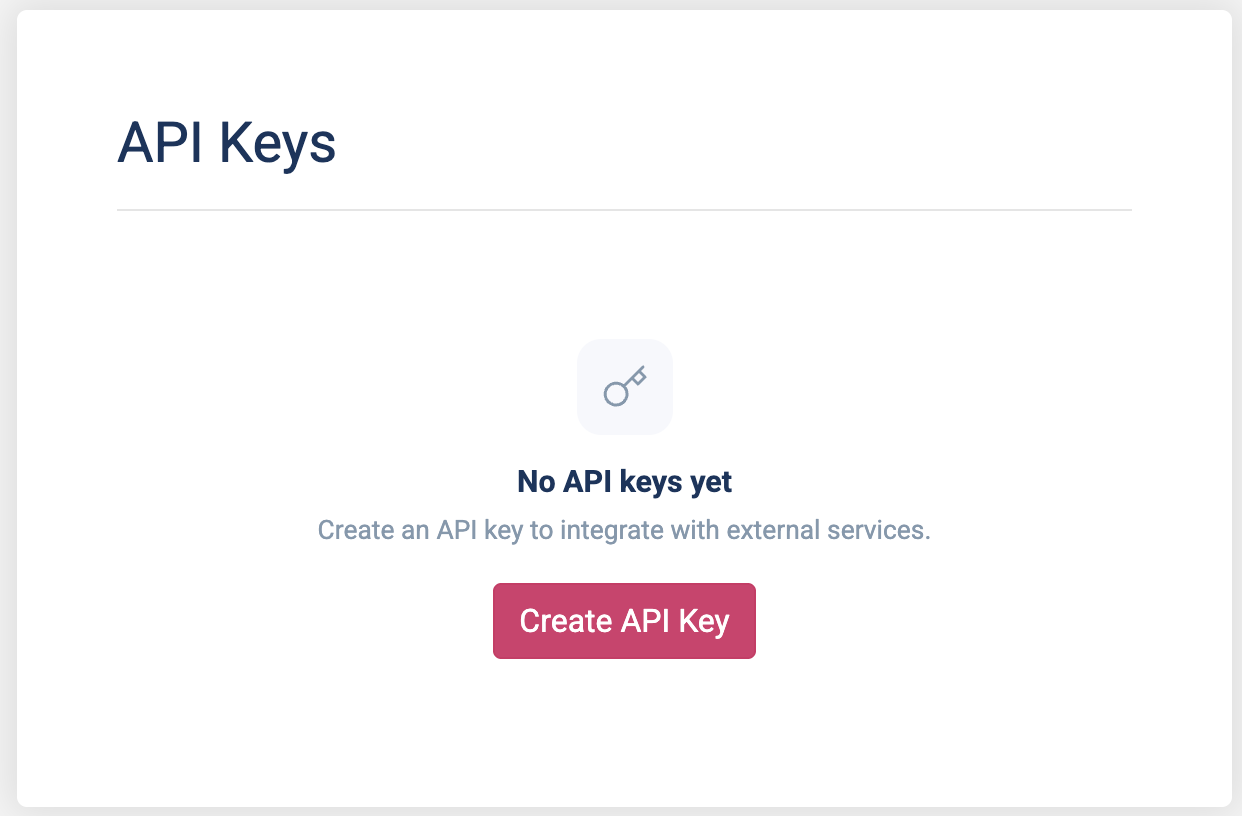
Creating a New API Key
Inside the API Keys section, you can generate a new key by clicking on the "Create API Key" button to start with.
When creating a key, you can:
Give the key a descriptive name (recommended for managing multiple integrations)
Choose the appropriate access level below Permissions:
Read-only — for fetching articles, categories, or public data
Read & write — for creating or updating content programmatically
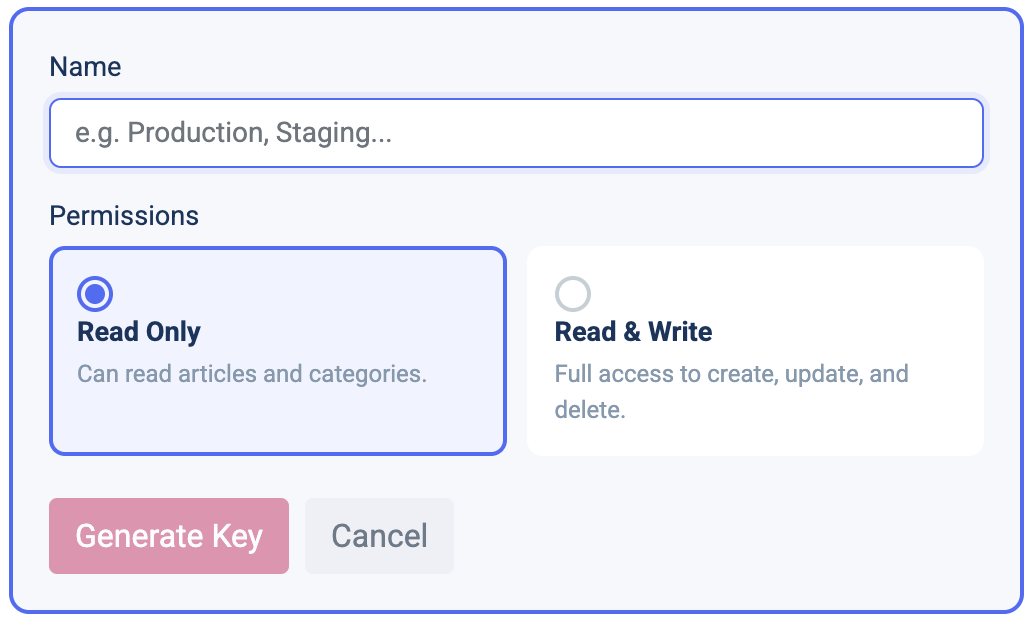
Once created, copy the key and store it securely.
Managing Existing API Keys
Once you have any keys created, from the same screen, you can:
View all active API keys
Revoke keys you no longer need
Rotate keys if one has been compromised
Changes take effect immediately.
Security Best Practices
To keep your help center secure:
Use read-only keys whenever write access isn’t required
Create separate keys per integration
Never expose API keys in client-side code or public repositories
Revoke unused keys regularly
What Can I Use the API For?
Common use cases include:
Syncing articles with other documentation systems
Powering custom search or AI assistants
Automating content updates
Integrating your help center into internal tools or workflows
For detailed endpoints and examples, see the API documentation.
If you’re unsure which access level you need or have a specific use case in mind, start with a read-only key — you can always create additional keys later.
-
Is HelpCenter.io right for my company?
Choosing the right support tools can feel overwhelming. Here’s how to decide if HelpCenter.io is a good fit for your business.
✅ When HelpCenter.io is an excellent choice
You want a simple, dedicated knowledge‑base tool. You’re looking to spin up a help centre quickly, not deploy a complex all‑in‑one support suite.
Your team is small or busy. There’s no need to hire developers; anyone can create articles, upload images and publish FAQs.
You value brand consistency. You’d like your help centre to look and feel like part of your product, with your logo, colours and custom domain.
You need both public and private docs. You serve customers externally and also want an internal knowledge base for your team.
You care about ownership. You want a secure, hosted solution where you own your content and can export it at any time.
🚫 When HelpCenter.io may not be what you need
You need a full‑blown ticketing system. We integrate nicely with existing support tools, but we’re not a replacement for ticket management.
You’re building a highly customised CMS. If you require deep, bespoke workflows or heavy CMS features, a more general content management platform might serve you better.
Two common use cases
1. Customer self‑service
Give your users a clean, searchable portal where they can find answers 24/7. HelpCenter.io handles hosting, SSL and SEO for you, so you can focus on writing great content. Many teams find that a well‑organised help centre reduces incoming support tickets and improves customer satisfaction.
2. Internal knowledge sharing
Create a private or password‑protected hub for onboarding guides, SOPs and company policies. You can invite team members with their own credentials or share a password with as many people as you like. Having a single source of truth makes onboarding faster and keeps everyone aligned.
Bottom line
If you’re a growing company that wants to offer self‑service support and internal documentation without the complexity of a full support suite, HelpCenter.io is likely a perfect fit. It excels at what it’s designed to do: help your users help themselves.
-
What is a help center site?
A public help center is a portal where your users can find the information they need without necessarily getting to your customer support team. It allows them to learn more about you, your products and services as well as self-educate on how to use them without much hassle. This site, for instance, is the help center of helpcenter.io (thus the name self.helpcenter.io :)).
Here's one more example you may have seen, it's the Help Center of Pinterest:
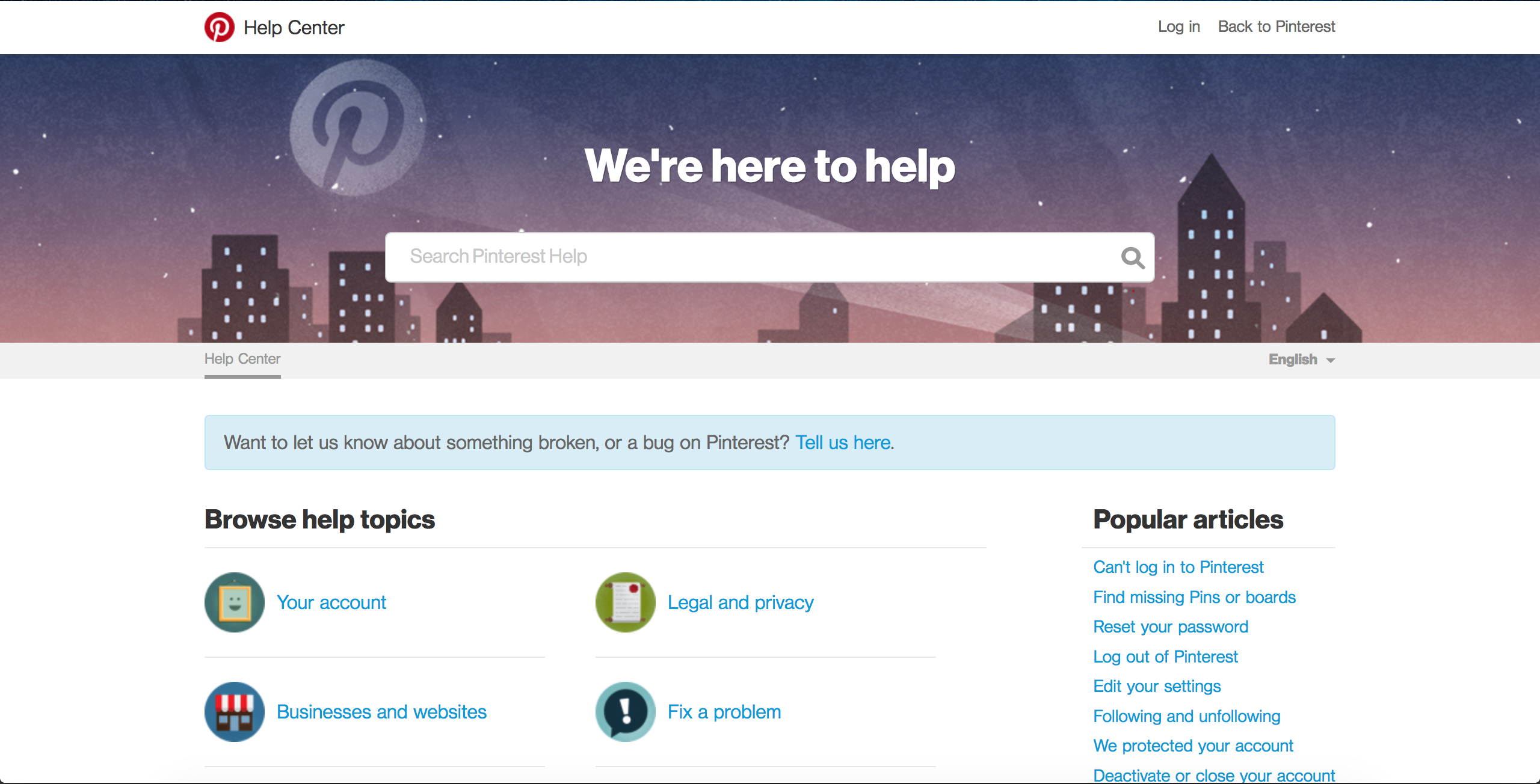
On the other hand, a private help center might be a place for you team to keep and organize all the information about things that need to be shared so they can more informed thus more efficient.
If you look around, almost every business has a help center. Facebook has one. Twitter also has one. And Google as well. GitHub too has a help center. I'm stopping here as I'm pretty sure you don't need more examples to see that having a help center site that allows your users to easily find information is crucial to your customer success efforts. And the fact that every major organization has one, proves it.
-
What makes HelpCenter.io unique?
Of course, our unprecedented focus on helping you achieve your goals is what we are mostly proud of.
But of you are asking about the software, here's what we have to offer.
Template Editor
With HelpCenter.io you are going to find the best Template Editor around. Our Template Editor allows you to build any knowledge base template you can imagine. Don't believe us? Cannot see how you should approach building your template? Reach out to us and ask. Our team of experts is here to help with any super-advanced customizations you may need. You will also get clear instructions to take it from there. Most of the time, you won't need us though.
Our Template Editor allows you to build your help center looks by yourself with the numerous options for customization available out-of-the-box together with the component-based homepage where you can arrange the content with drag-and-drop.
Stats and Changes History
Rich statistics spawning a year back together with detailed articles changes log would allow you to dig into the internals of your knowledge base. See it evolving and improving. A neat content diff will make it easier for you to understand the contributions of your team.
Integrations
The numerous integrations will allow you to bring your knowledge base anywhere around the web and utilize it at its most. For example, with our plugins from Front you can get your help center right where your customer support team and customer enquiries are and provide fact-checked answers in a blink. Therefore, you can substantially increase the productivity of your customer success team and provide better answers to your customers.
Smart Widget...
...that's better than your average chat bot
Our smart widget is there to replace most ineffective chat bots which only leave your customers more frustrated, unable to find a way to reach out to you, when the bot is unable to satisfy their needs. We take a different approach. Our smart widget is not there to replace your customer support team. It is there to assists them. Imagine the smart widget as your first line of customer support. It analyzes the context of the current page and suggests relevant articles from your knowledge base. It integrates within your application and website and provides relevant answers even before your customers have thought of asking the question. We believe in the assistive nature of tools and that's what we are building with the Smart Widget we offer.
Not to mention our content editor which you won't even notice but will any option you might need will be there right when you need it.
All this complemented with a neat, intuitive and friendly UI.
If all of this was not enough to convince you start your trial, reach out to us or schedule a demo and we will show you the rest.
-
What's the difference between a help center and a knowledge base?
There isn't, in the case of HelpCenter.io, help center and knowledge base mean the same thing and the two are being used interchangeably throughout the content.
-
Do I get an SSL certificate for my help center?
Regardless of your subscription plan and whether you have your help center on a custom domain or simply on one provided by us, you always get a free SSL certificate for all your help centers.
The certificates are usually issued by Let's Encrypt or Amazon but if you need a custom one for your help center feel free to write to us and we will think of something. You may use the contacts form to get in touch with us.
-
Will I get an SSL certificate for my custom domain name?
Yes, every custom domain you set up for your help centers gets an SSL certificate. Read more about SSL certificates being issued in this help center article.
-
How do I get a free migration of my existing help center?
In order to request our free migration service, everything you should do is write us at our support email or contact us through the contacts form and provide us with an access to your current help center.
When we hear from you, we will evaluate it and come up with an estimate how long it will take us to complete the migration for your case. On top of migrating all your content, we can also completely migrate the styles of your previous help center if you'd like us to do so. Just let us know.
Articles
Still stuck?
Our team answers in a few hours.