

Change the wording of the buttons, labels and messages HelpCenter.io shows on your help center, like "On this page" or "Skip to content", and translate them into each of your languages.
Who can do this: Owners and Admins · Plans: All plans (translating into other languages needs Growth or Catalyst)
Change or translate a phrase
In the left menu, click the gear icon, then Localization.
Under Interface translations, pick the language you want to edit.
Type in Search phrases… to find the phrase, or pick a group from the list on the left.
Type your wording.
Click Save changes.
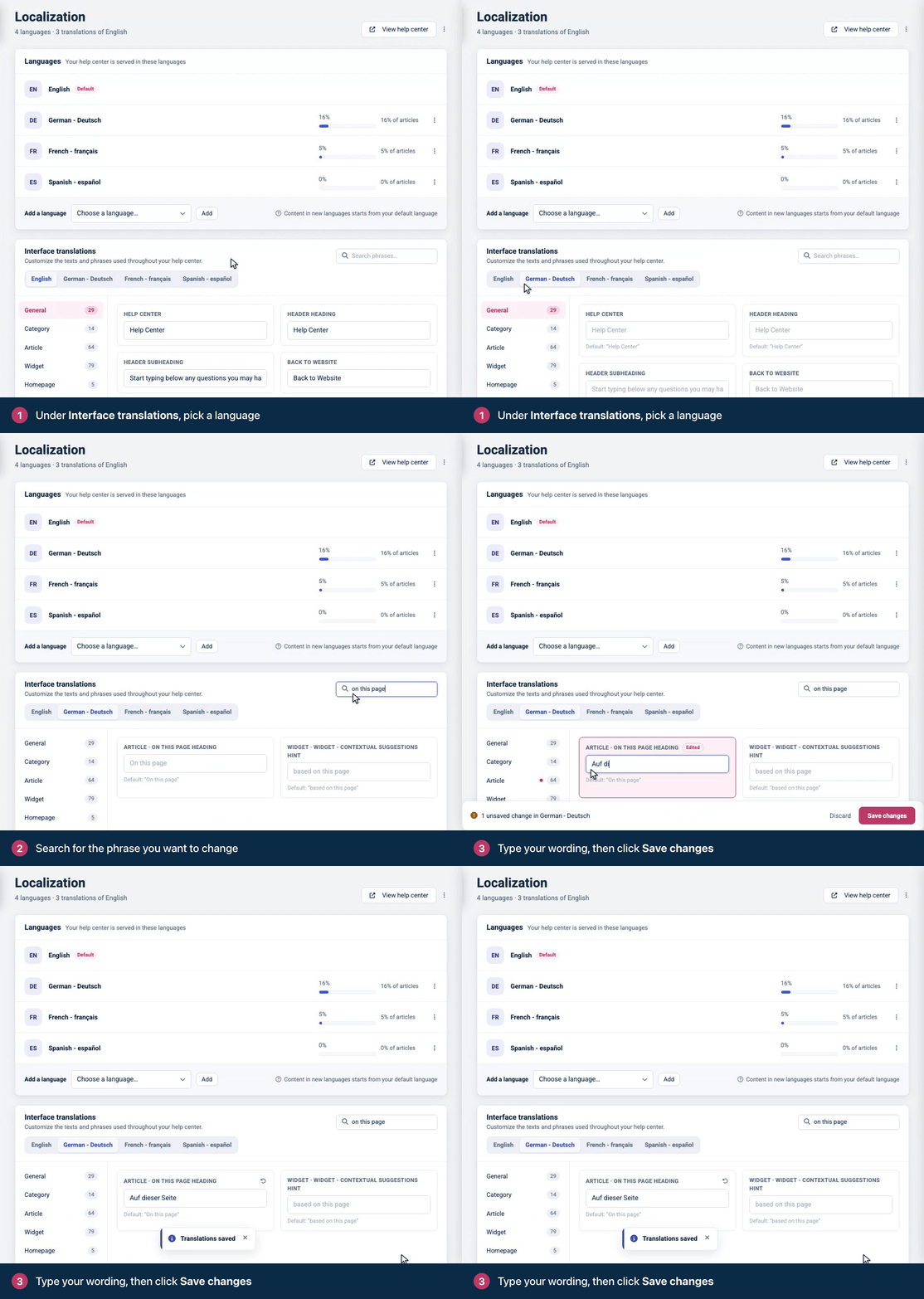
A message confirms Translations saved, and your help center uses the new wording. There's nothing to publish.
While you edit a language other than your default, each field shows the default wording underneath it. Phrases you've changed are marked Edited until you save, and Discard throws away unsaved changes.
Phrase groups
Group | Examples |
|---|---|
General | The basic phrases of your help center, such as "Help Center". |
Article | Texts on article pages, such as "On this page" and the Export menu's "Download PDF". |
Category | Article counts and "Updated" on category pages. |
Homepage | "Recent articles", "Featured articles", "Frequently asked questions". |
Search | "How can we help?", "No results. Try a different query." |
Contact | "Contact us", "Send message". |
Navigation & footer | "Browse", "Powered by HelpCenter.io". |
Error pages | "We couldn't find that page", "Go to homepage". |
Accessibility | "Skip to content" and labels that only screen readers announce, such as "Search the help center". |
Widget | The widget's buttons and messages. |
FAQ sections | Texts the FAQ section templates show on your website, such as "Search questions and answers" and "Still need help?". See Embed FAQ sections on your website. |
Tips for translating phrases
Keep placeholders as they are. Some phrases contain words that start with a colon, like
:countor:query. HelpCenter.io replaces them with a number or a search term, so translate the words around them and leave them unchanged.Keep the plural separator. Phrases like
:articles_count article|:articles_count articleshold a singular and a plural form separated by|. Translate both forms and keep the|.Untranslated phrases show in English. HelpCenter.io's built-in phrases are in English. When you add a language, translate the phrases readers see most, such as the search and article texts.
Widget texts in English come from the widget itself. To change the widget's greeting and heading in English, use Embeddables. See Change the widget's greeting and texts.
Go back to the default wording
Next to a phrase you've changed, click the Reset to default button (the circular arrow). The default wording fills the field. Click Save changes to keep it.
Texts you typed yourself
Headings, links and texts you added in the template editor, like your hero heading or footer, aren't listed here. Neither are texts a component holds in its own settings, such as the Prompt of Was this helpful?: when that field is filled in, readers see it instead of the matching phrase here. Translate those in the template editor. See Translate texts in your design.
Comments
Be the first to comment.