

Content performance and Satisfaction show which articles readers use and like, and which ones need work. A few minutes here each month tells you where an edit will help the most readers.
Who can do this: Owners, Admins and Editors · Plans: All plans
See your top and weakest articles
In the left menu, click Statistics and pick a period.
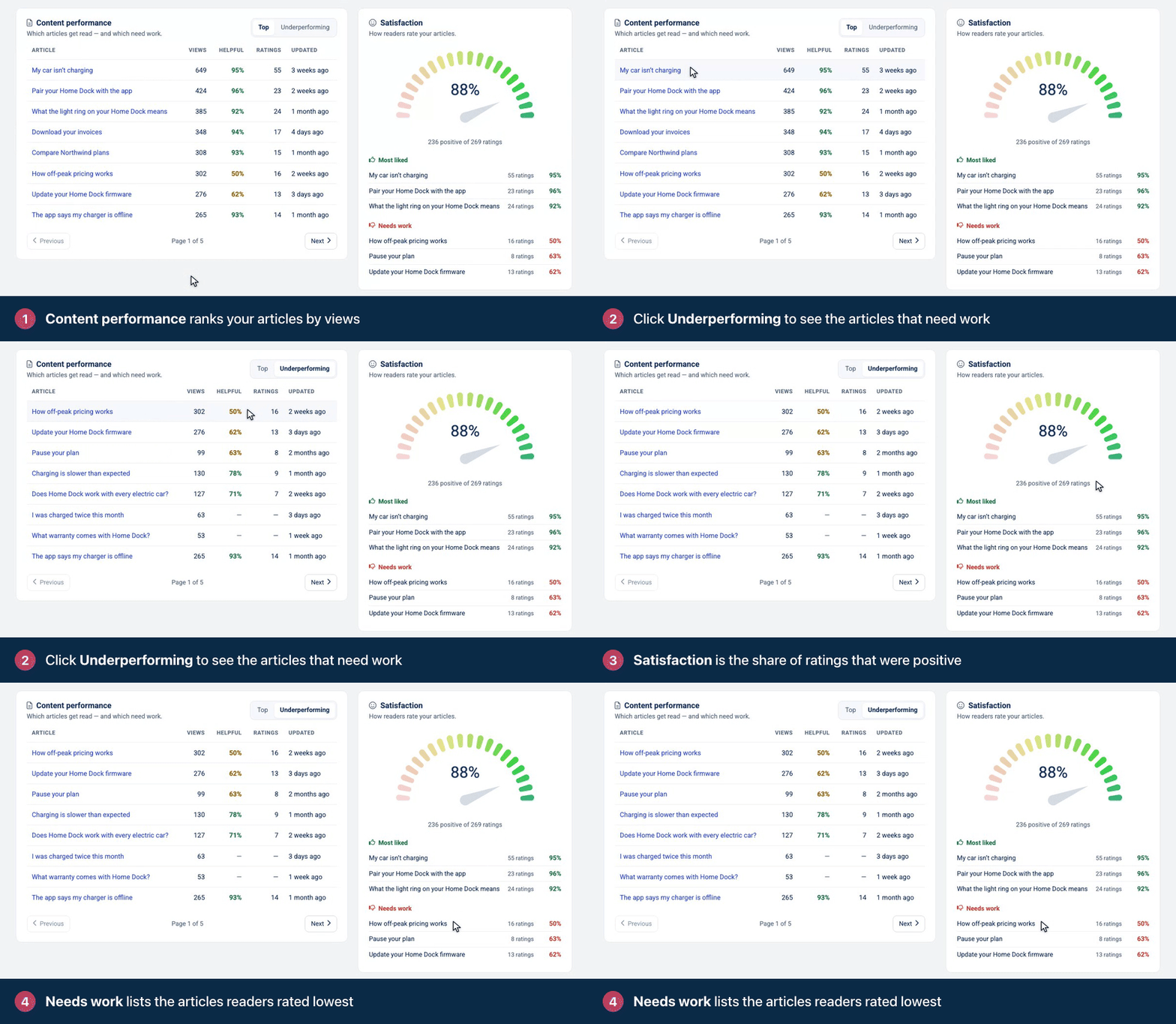
Scroll down to Content performance. Top lists your articles by views, most read first.
Click Underperforming to put the articles with the largest share of negative ratings first.
Look at the Satisfaction card next to it for your overall score and the articles readers rated best and worst.
What the columns mean
Column | What it shows |
|---|---|
Article | The article's title. Click it to open the article in the editor. |
Views | Views in the selected period. |
Helpful | The share of the article's ratings in the period that were positive. Hover over it to see the counts. |
Ratings | How many ratings the article got in the period. |
Updated | When the article was last changed. |
Underperforming sorts by the share of negative ratings each article has received over its lifetime, then by views. Articles nobody opened in the period aren't listed.
The Satisfaction card
The gauge shows the share of all ratings in the period that were positive, with the counts below it, such as "42 of 50 ratings positive". Under that, Helpful and Not helpful show how many ratings of each kind came in, and Love it joins them once a reader has used it.
Most liked shows up to three articles where more than half of the ratings were positive, highest share first.
Needs work shows up to three of the other rated articles, lowest share first. An article at exactly 50% lands here.
An article appears in only one of the two lists. Each row shows the article's share of positive ratings and how many ratings it got, so a 100% from a single rating is easy to spot. When two articles have the same share, the one with more ratings comes first.
If the card says Not enough ratings yet, choose a longer period. See Article ratings and reader feedback for how ratings work.
What to do with each article
What you see | What to do |
|---|---|
Many views, rated helpful | Keep it current, and link to it from related articles so more readers find it. |
Many views, rated unhelpful | Fix this first: many readers land on it and leave without an answer. Check the steps against the product, add what's missing, and make the answer easier to find at the top. |
Few views, rated helpful | Make it easier to find: use the words readers search for in the title, and link to it from busy articles. |
Few views, rated unhelpful | Rewrite it, merge it into a stronger article, or retire it. |
Weigh ratings against views. One thumbs-down on an article with three views says less than twenty on an article with a thousand.
Private, trashed and deleted articles
Private article with a lock: the article is private and hasn't been shared with you. Its numbers still count.
In trash: the article is in the trash. Restore it to open it in the editor.
Deleted article: the article no longer exists.
To check one article's views and rating without leaving your article list, click its title in Articles to open its details. See See article details and make quick edits.
Comments
Be the first to comment.