

Serve your help center in more than one language so readers can find answers in the language they speak. Add a language once, then translate your articles, categories and interface texts at your own pace.
Who can do this: Owners and Admins · Plans: Growth and Catalyst (Bootstrap includes one language)
Add a language
In the left menu, click the gear icon, then Localization.
Under Add a language, open Choose a language… and pick the language.
Click Add.
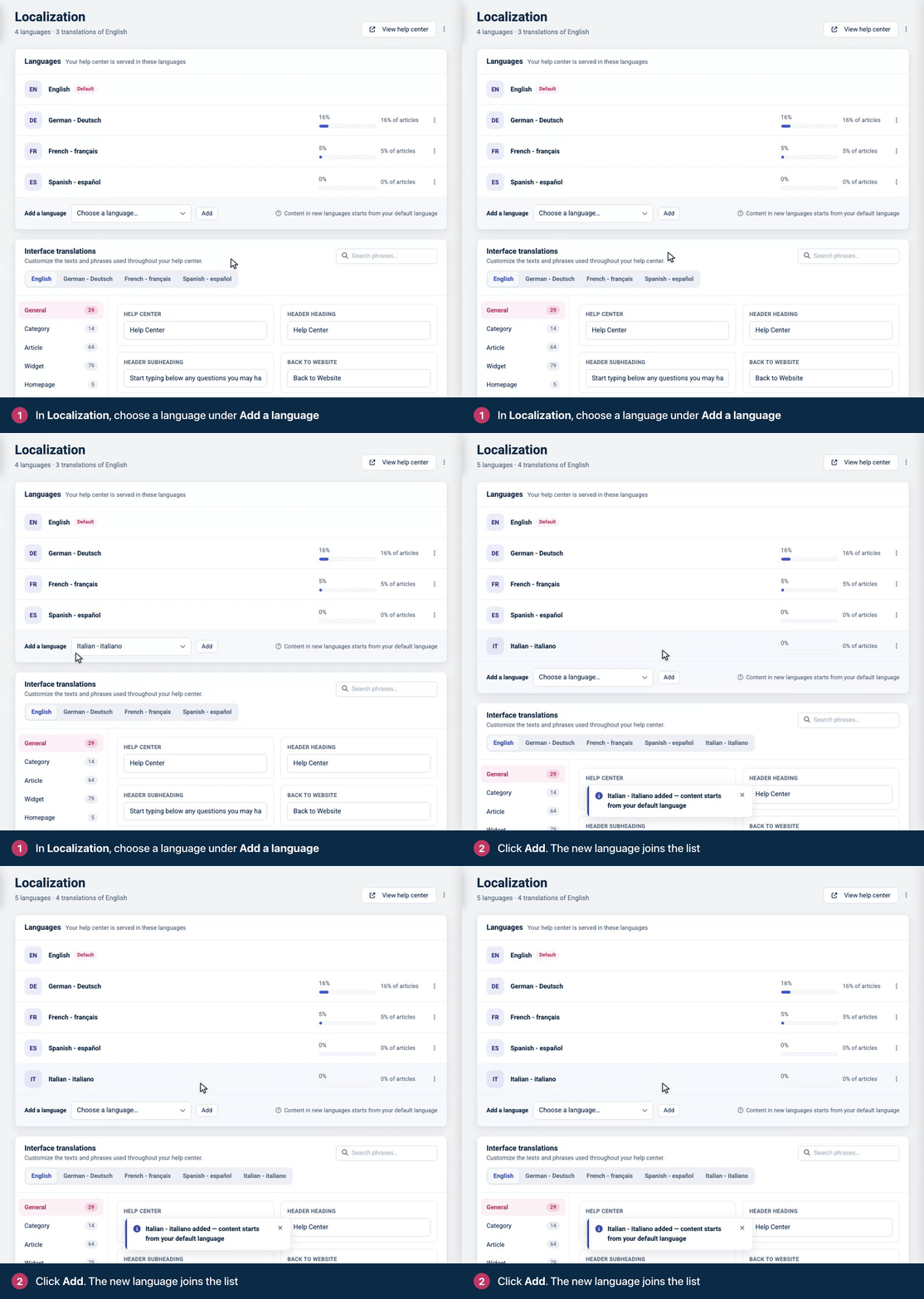
The language now appears under Languages, next to your default language (marked Default). A bar shows how many of your articles have a released translation in it, starting at 0%.
What changes when you add a language
Articles appear in the new language only after you translate and release them. Readers browsing in that language don't see untranslated articles.
Categories show their default-language name and description until you translate them.
Buttons and labels, such as "On this page", show in English until you translate them under Interface translations.
Article addresses include a language code from now on, for example
/en/content/reset-your-passwordand/de/content/passwort-zuruecksetzen.Readers whose browser uses the new language can be taken to your home page in that language on their first visit. Translate and release your most-read articles soon after you add a language, so those readers find answers there.
In the dashboard, the article editor gets a language bar above the title, and the Articles list gets a language menu that shows how much is translated.
Which languages you can add
HelpCenter.io supports 43 languages, including regional variants such as German (Austria) and German (Switzerland), and both Simplified and Traditional Chinese. Arabic, Hebrew and Persian display right to left automatically.
Next steps
Translate an article by hand, or translate articles with AI on the Catalyst plan.
Check that readers can switch languages: see How readers see other languages.
Troubleshooting
The language menu is grayed out and says "Multiple languages are available on higher plans". Your help center is on Bootstrap, which includes one language. Change your plan to Growth or Catalyst to add more.
The new language doesn't show on my help center. A language appears for readers once at least one published article has a released translation in it. See Release translations and change your default language.
My header has no language switcher. Themes leave it out while a help center has one language. Add the Language switcher component in the template editor, as described in How readers see other languages.
Comments
Be the first to comment.