

You can run as many help centers as you need from one HelpCenter.io account, for example one for each product or brand. Each help center has its own subscription, and you manage them all from the same place.
Who can do this: The account owner · Plans: All plans, once your subscription is active (each help center is billed on its own)
Before you start
Activate your subscription. On the free trial, before you subscribe, you can't add a second help center: you see "Oops, you do not seem to have an active subscription, yet." Click Activate Subscription to subscribe first. See Choose a plan and start your subscription.
Use the account owner's login. If you created your HelpCenter.io account from a teammate's invitation, you don't see Create New Help Center. Ask the account owner to create the help center.
Create a help center
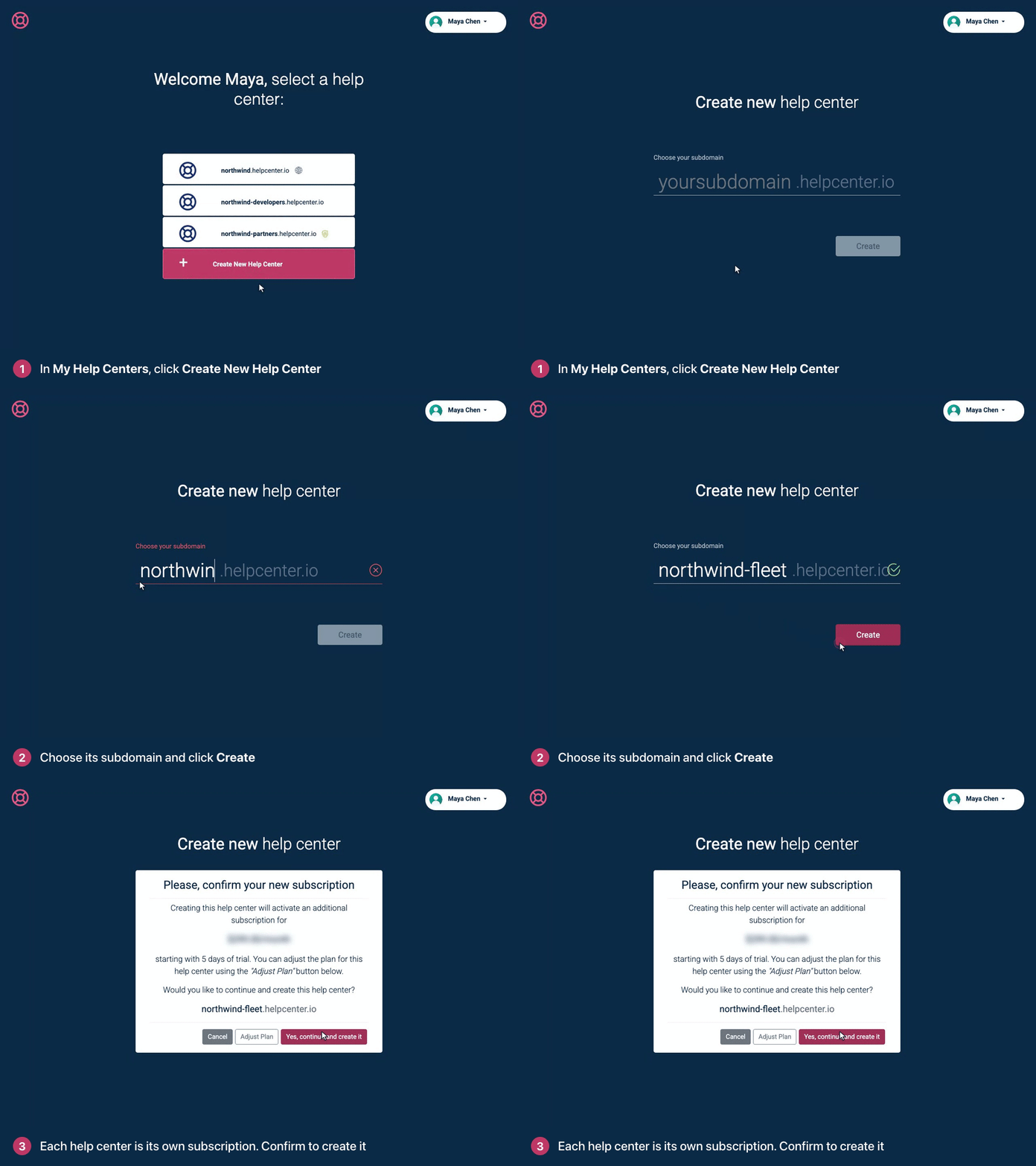
Go to My Help Centers at helpcenter.io/app/sites.
Click Create New Help Center.
Under Choose your subdomain, type the new help center's address. A tick means it's free.
Click Create.
Check the confirmation: it shows the price of the new subscription. To choose a different plan or billing period for this help center, click Adjust Plan.
Click Yes, continue and create it.
What happens next
The new help center opens on its Articles page, with a General category and a draft article to start from.
It starts Private. When it's ready for readers, see Make your help center public.
Its subscription starts with a free trial: the days left on your own free trial, or 5 days if your trial is over.
Nothing is copied from your other help centers. Give it its own design, and invite its team separately. See Invite your team.
Each help center is billed at its plan's flat price, not per team member. See How much does each additional help center cost? and Plans and pricing.
Troubleshooting
"The subdomain has already been taken." Pick another address. The same rules apply as when you signed up: 3 to 63 characters, using letters, numbers and dashes.
"Could not create your help center at the moment. Please contact us." Contact our support team and tell us the subdomain you tried.
Comments
Be the first to comment.