

Serve your help center from your own address, like help.example.com, instead of yourname.helpcenter.io. Readers stay on your brand, and HelpCenter.io sets up a free SSL certificate for the new address automatically.
Who can do this: Owners and Admins · Plans: All plans
Want your help center at a path of your website instead, like www.example.com/docs? On Growth and Catalyst, see Host your help center in a subfolder of your website.
Before you start
Pick a subdomain of your domain, such as help.example.com, support.example.com or docs.example.com. Your bare domain (example.com) won't work, because it can't take the CNAME record HelpCenter.io needs. Leave out www too: HelpCenter.io removes it from the address you enter.
Make sure you can edit your domain's DNS records. They usually live where you bought the domain, or with a service like Cloudflare if your domain uses one.
Add your domain
In the left menu, click the gear icon, then Settings.
In the Custom domain card, type your address in Domain, for example
help.example.com. Leave outhttps://and any slash at the end.Click Apply. You'll see "Custom domain successfully applied." and, under Configure your DNS, the record to create.
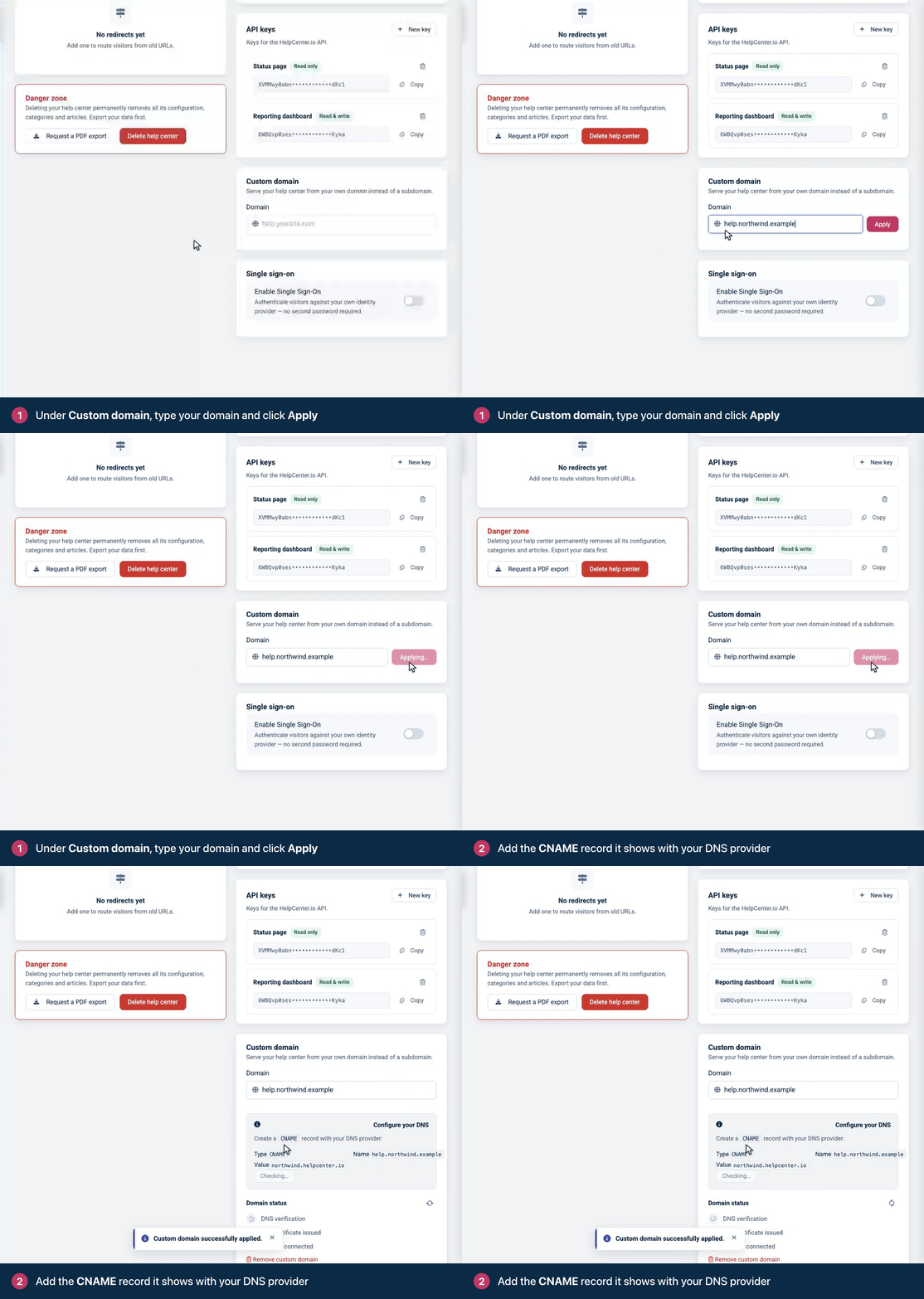
Add the CNAME record
Sign in to your DNS provider and create this record:
Type | Name | Value |
|---|---|---|
CNAME | Your subdomain, for example | Your help center's current address, for example |
Most providers want only the first part of the name (
help) and add your domain for you. A few want the fullhelp.example.com. The card shows the full name.Copy the value from the card. It has no
https://and no slash.If an A, AAAA or another CNAME record already uses the same name, delete it first. A name with a CNAME record can't have any other record.
Step-by-step guides: Cloudflare, Namecheap, GoDaddy and NameBright. For other providers, search their help for "add a CNAME record".
Using Cloudflare? Set the record's proxy status to DNS only (grey cloud). With the proxy on, HelpCenter.io can't see your CNAME record, so it can't verify your domain or issue its SSL certificate.
Verify DNS and go live
Back in the Custom domain card, click Verify DNS.
Follow Domain status as it moves through DNS verification, SSL certificate issued and Domain connected. When all three are checked, the card says "Your custom domain is fully configured and live."
If you see "The DNS record seems to be incorrect.", the record isn't visible yet. DNS changes can take a while to spread, so give it time. You don't have to keep the page open: HelpCenter.io checks your domain on its own every 5 minutes on the first day, every hour for the rest of the first week, and then once a day. Click the refresh button next to Domain status to see where things stand.
Once DNS verifies, the SSL certificate is issued and connected for you. This can take several minutes. From then on, your helpcenter.io address redirects to your own domain, so links to the old address keep working.
Change or remove your domain
To change it, type the new address in Domain, click Apply, and create a CNAME record for the new name.
To remove it, click Remove custom domain, then Yes, remove. Your help center goes back to its helpcenter.io address, and links that use your own domain stop working. Delete the CNAME record at your DNS provider too.
Changing your domain several times within a month can be refused, even though the card confirms the change. If a new domain passes DNS verification but never gets its SSL certificate, contact support.
If you rename your help center's subdomain, point the CNAME record at the new name. See Change your help center's address.
Troubleshooting
"Invalid domain name. Please do not include http(s):// or trailing slash. Multiple subdomain levels are supported." Enter only the address, like help.example.com.
The card says your address isn't a custom domain. You entered a .helpcenter.io address. Those are managed for you; enter an address on your own domain.
"The DNS record seems to be incorrect." Check the record's name and value, delete any other record with the same name, switch off Cloudflare's proxy, and allow time for the change to spread. See My custom domain isn't working.
The card says custom domains are not available on your current plan. Every current plan includes a custom domain. Click Upgrade your plan to move your help center to one.
Comments
Be the first to comment.