

Bring your help center into Front. Your team can search your articles, insert them into replies and create new articles from a conversation, and on plans with AI, draft a reply from your articles in one click.
Who can do this: Owners and Admins · Plans: All plans (Generate AI Reply needs the Catalyst plan, or the AI add-on on Bootstrap and Growth)
Step 1: Enable the HelpCenter.io app in Front
In Front, open your company settings, go to the App Store and search for HelpCenter.io.
Click See details on the HelpCenter.io app, then Enable app in the top-right corner.
Front shows a Secret key in the Configure app window. Copy it.
Closed the window too soon? Go back to the App Store, open HelpCenter.io and click Configure app to see the key again.
Step 2: Connect Front in HelpCenter.io
In the left menu, click the gear icon, then Settings.
Under Integrations, switch on Front.
Paste the key into Secret key and click Save.
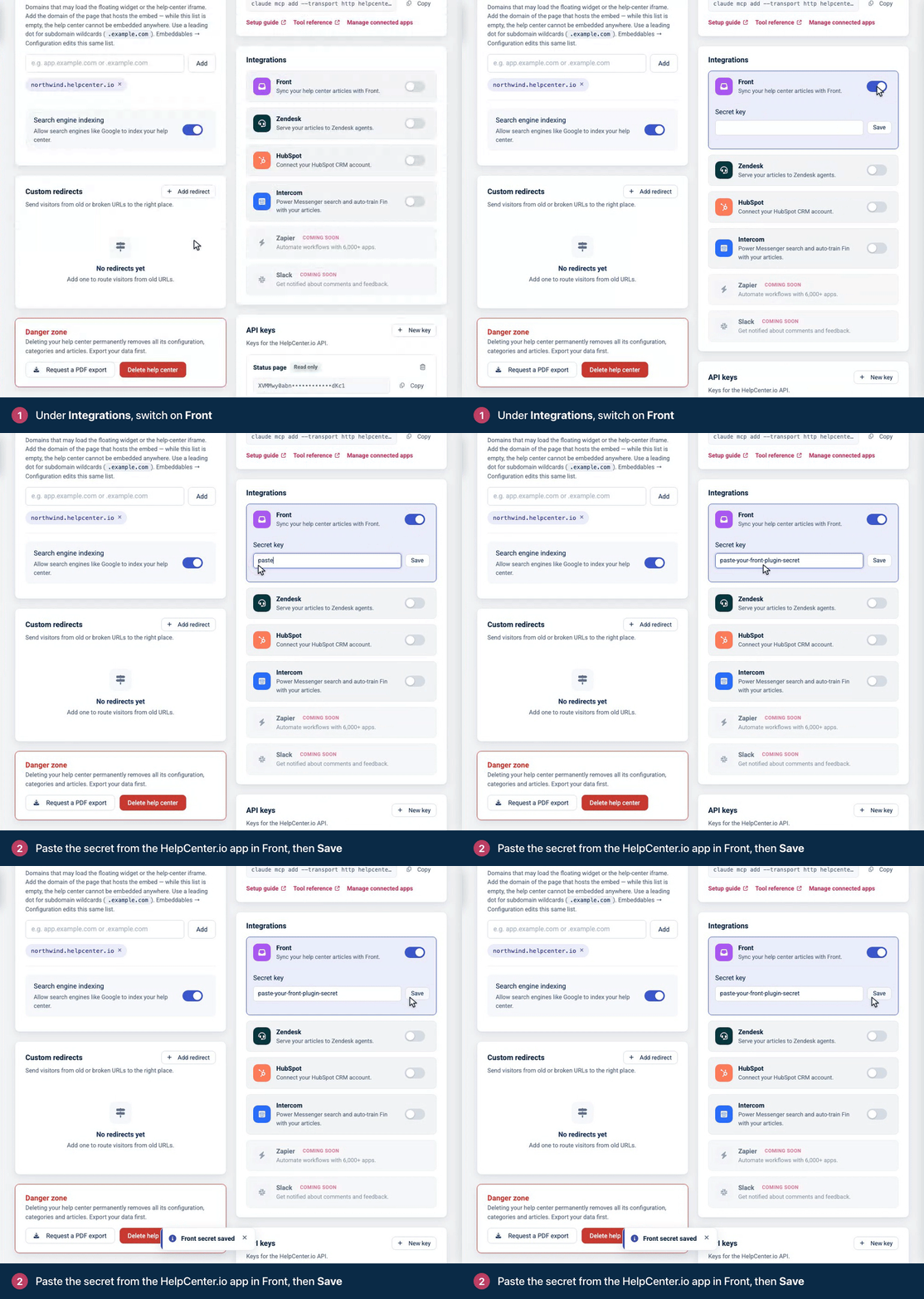
Go back to Front and open a conversation. The HelpCenter.io sidebar is ready to use.
What your team can do in Front
Find articles: type in Search here... or browse your categories.
Use an article in a reply: open it, select the text you need and insert it into your reply, or insert a link to the article. For an FAQ, you can insert the whole answer. A selection that includes one of your team's internal notes isn't inserted.
Copy or edit: copy the article's address, or open it in HelpCenter.io to edit it.
Go to help center opens your help center.
Create an Article: the + button opens a form with a title, type (Article or FAQ), category and content. The article is saved as a draft for you to finish in HelpCenter.io. This works when your email address in Front matches a HelpCenter.io account that can edit this help center (Owner, Admin or Editor).
Generate AI Reply: drafts a reply to the conversation from your articles and lists its Sources. Click Use to put it in your reply, and rate it with a thumbs up or down. When your articles don't cover the question, it tells you, so you can answer by hand. There's a daily allowance of AI replies, and the button shows how many you've used.
Troubleshooting
The sidebar says "The Front plugin doesn't seem to be configured with your help center." Switch on Front under Settings → Integrations, paste the secret key from Front and click Save. Then reload the sidebar.
Creating an article doesn't work. Your Front email address needs to match your HelpCenter.io account, and that account needs the Owner, Admin or Editor role on this help center. See Roles and permissions.
The sidebar says "Thank you for trying HelpCenter.io!" or "Continue with HelpCenter.io". Your free trial or subscription has ended, so the sidebar can't show your articles. The account owner can click Activate subscription on HelpCenter.io, then Reload the plugin. See What happens when a trial or subscription ends?
There's no Generate AI Reply button. AI replies need the Catalyst plan or the AI add-on, and they appear inside a conversation. See Add AI Answers to your plan.
Comments
Be the first to comment.