

Move a help center to a different plan, or switch between monthly and yearly billing. Each help center has its own plan, so changing one doesn't affect the others.
Who can do this: The account owner · Plans: All plans
Change a help center's plan
At the bottom of the left menu, click your avatar, then Billing & Invoices.
If you have more than one help center, click the arrow next to Your plan and pick the help center you want to change.
Click Change.
Choose Yearly or Monthly.
Click Choose on the new plan. The change is made right away, without another confirmation.
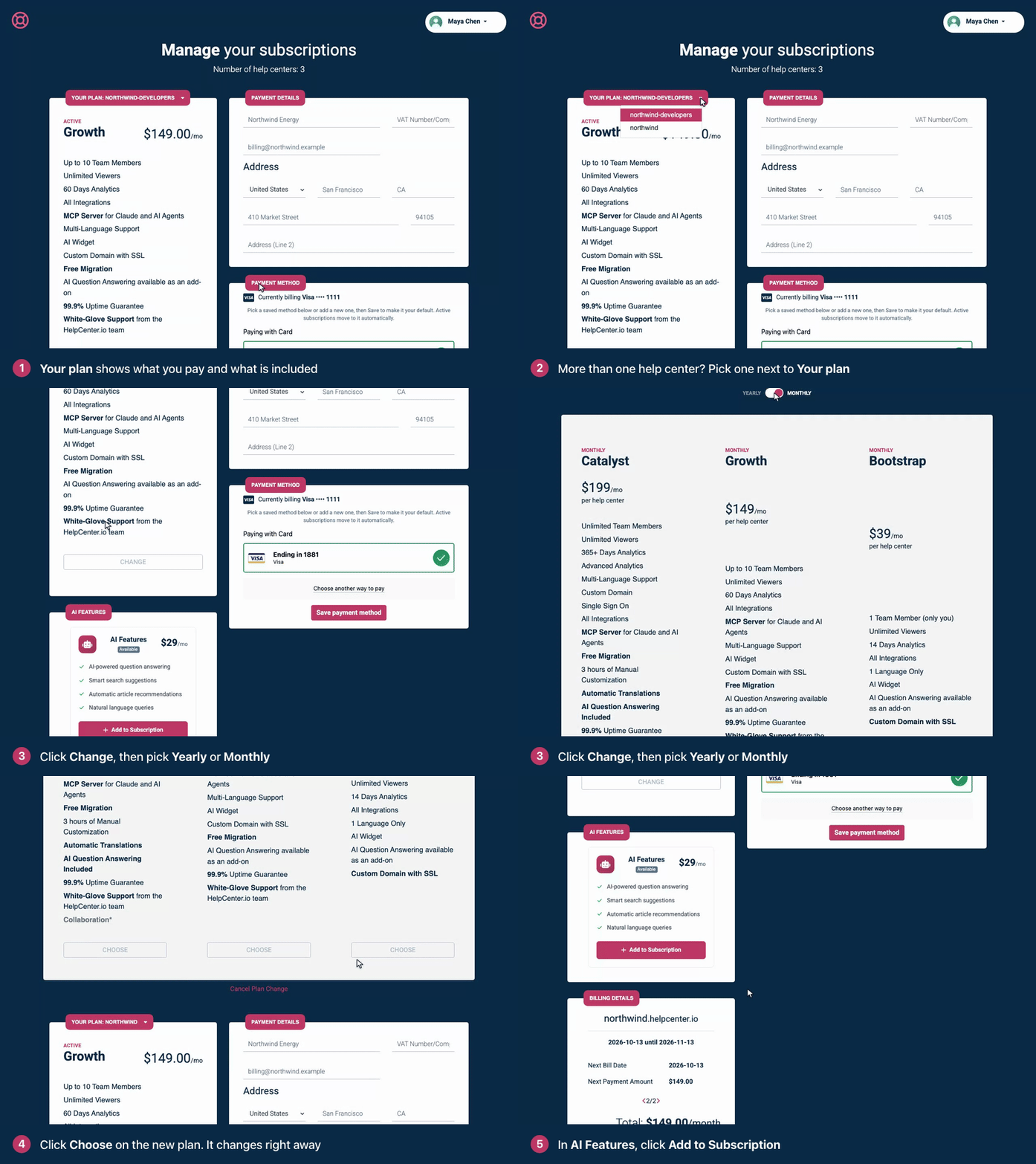
Changed your mind before choosing? Click Cancel Plan Change.
What changes when you switch
Moving to a bigger plan: the new features are available right away. The price difference for the rest of your billing period is prorated.
Moving to a smaller plan: features only the bigger plan includes, such as AI translation (Catalyst only), are no longer available. Your articles and settings aren't deleted, and a single sign-on setup you already have keeps working.
Switching between monthly and yearly: the new billing period starts when the period you've already paid for ends.
The AI add-on: moving to Catalyst removes it, since Catalyst includes AI. Moving from Catalyst to Growth or Bootstrap turns AI features off unless you add the AI add-on.
Still in your trial? Your remaining trial days carry over to the new plan.
Compare what each plan includes in Plans and pricing.
Plans on a 12-month term
If your plan runs on a 12-month term billed monthly, there's no Change button. Email support@helpcenter.io and we'll change it for you.
Troubleshooting
"Unable to change your subscription plan at the moment. Please try again or contact us." Reload the page and try again. If it keeps happening, email support@helpcenter.io.
You see "Unauthorized". Only the account owner can change plans. Ask them to make the change.
There's no Change button next to your plan. Your plan runs on a 12-month term, so our team changes it for you.
Comments
Be the first to comment.