

When the widget's button doesn't appear on your site, one of these causes is almost always behind it. Start at the top.
Your browser's console often names the problem. In most browsers, right-click the page, choose Inspect, then open the Console tab and reload the page.
Your website isn't in Embedding origins
This is the most common cause. The widget runs only on websites you've approved, and while the list is empty it's blocked everywhere. The console shows "Parent domain is not in the allowed list." followed by the domain the widget found.
Click the gear icon, then Settings.
Under Embedding origins, type the domain of the page that shows the widget, for example
www.example.com, and click Add.Click Save changes, then reload the page with the widget.
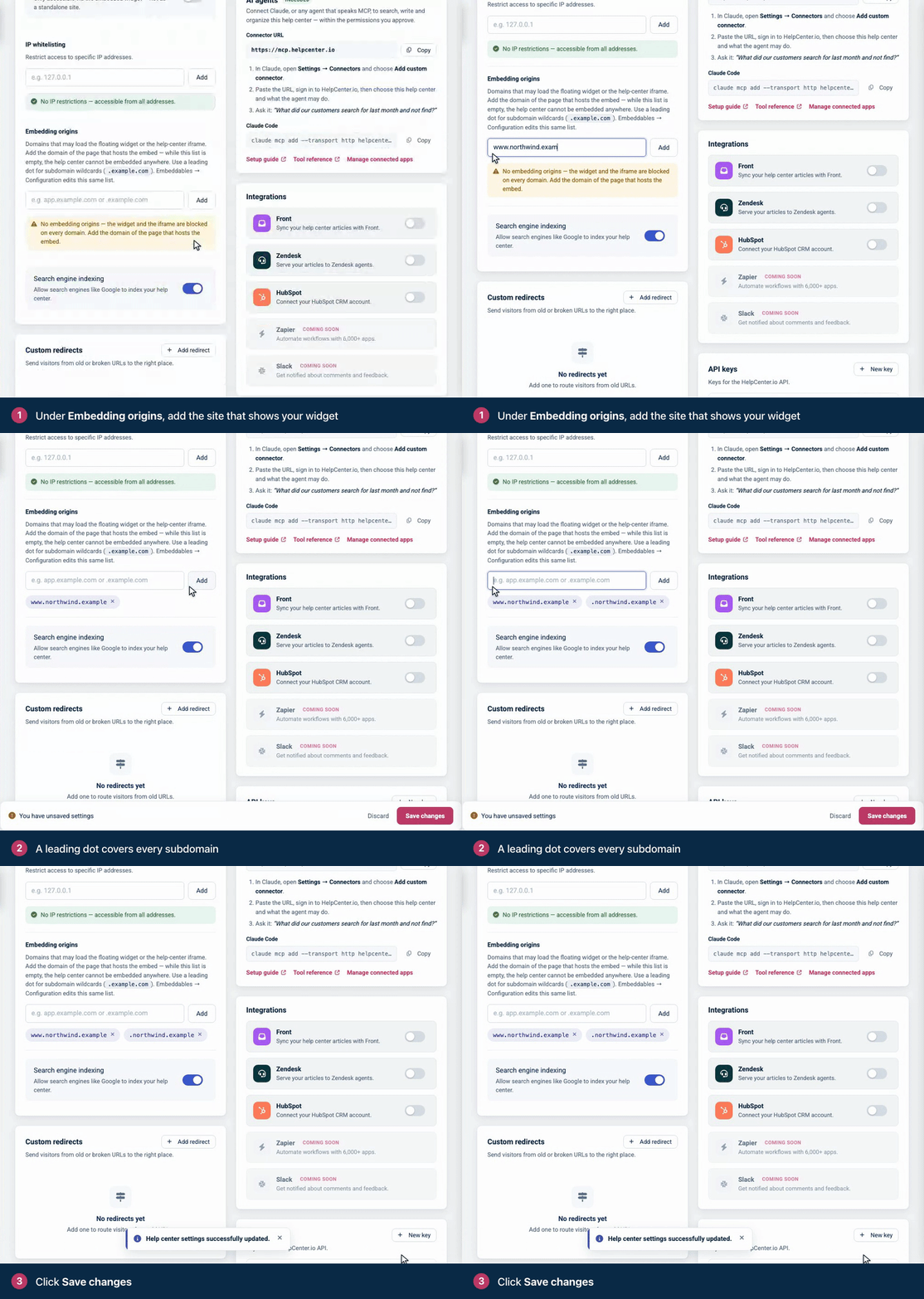
Enter the domain only, without
https://or a page path. If you paste a full address, only the domain is kept.example.comandwww.example.comare different domains. Add both, or add.example.com: a leading dot covers the domain and all its subdomains.Ports don't matter, so
localhostalso coverslocalhost:9090while you test on your own computer.Add as many domains as you need. You'll find the same list under Embeddables → Widget → Configuration.
The snippet isn't running on the page
To check, type hcOptions in the console and press Enter. If you see your app_id, the snippet ran. If the console says hcOptions is not defined, it didn't.
Copy the snippet again: click the gear icon, then Embeddables, and under Installation click Copy.
Paste it right before the closing
</body>tag of the page. The snippet adds the widget to the page body, so placed in the<head>it runs before there's a body and fails.Added it with a tag manager or a website builder? Check that the change is published and set to run on this page.
The app_id doesn't match
Each widget has its own ID, shown in the snippet as app_id. With a typo, or a snippet copied from another help center, the widget loads nothing, and requests to embed.helpcenter.io in the browser's Network tab answer "Widget not found." Copy the snippet again from Embeddables and replace the old one.
The button is hidden on purpose
showButton: falseinhcOptionshides the round button. The widget still loads and opens when your own button callshcWidget.show(). See Open the widget from your own UI on the developer portal.widgetEnabled: falsestops the widget from loading at all. Remove it to bring the widget back.
The widget opens, but visitors can't read anything
Your help center is Private or uses a password. Visitors who aren't signed in can't read it through the widget, and requests answer "This help center requires authentication." Make the help center Public, or sign visitors in with JWT (Catalyst plan). See Sign readers in with your own login (JWT SSO) and Sign readers into the widget with a JWT on the developer portal.
IP whitelisting is on. Visitors outside the listed addresses see Not available on this network in the widget. Add their addresses or clear the list. See Restrict access by IP address.
Something on your website blocks it
Ad blockers and privacy extensions can block the widget for some visitors. Test in a private window with extensions turned off.
A cookie consent tool that holds back scripts until visitors agree also holds back the widget until then.
A Content Security Policy. If your site sends one, allow
https://helpcenter.ioinscript-src, andhttps://embed.helpcenter.ioinframe-srcandconnect-src. The snippet itself is an inline script, so allow it too (with a nonce or a hash), or sethcOptionsfrom a script file of your own. For widget statistics, also allowhttps://metrics.helpcenter.ioinconnect-src. The console names anything it blocked. See Content Security Policy and allowed origins on the developer portal.
"Parent domain not found. Cannot render the widget."
The widget couldn't tell which website it's on. Some browsers show this when your site tells them not to share the page address (a Referrer-Policy of no-referrer). Use a referrer policy that shares at least the site's domain. Test on a real web address too: on a page opened as a file on your computer, the widget doesn't load at all.
Still stuck?
Contact our support team and include the address of the page where the widget should appear. See Contact HelpCenter.io support.
Related articles
Widget JavaScript API on the developer portal
Comments
Be the first to comment.